
Title Tag
What Is a Title Tag?
A title tag is an HTML element that defines the title of a webpage. It tells search engines and users what the page is about.
It is usually displayed as a clickable headline in search engine results pages (SERPs). Title tags can also appear in browser tabs and when someone shares a webpage on certain platforms.
Here is an example of a title tag:
<title>SEO Services: Improve Your Website Rankings | SearchRevv</title>
A title tag helps search engines understand the main topic of a webpage. It also helps users decide whether a page is relevant to their search.
Where Does a Title Tag Appear?
1. Google Search Results
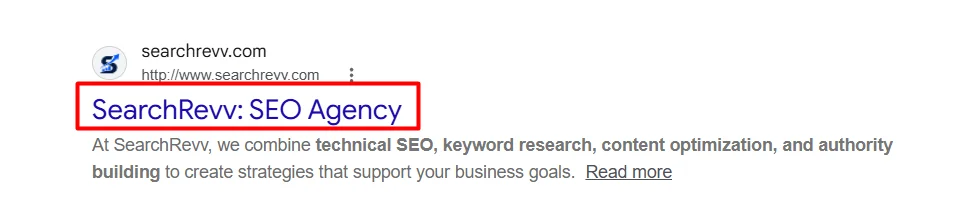
The title tag usually appears as the clickable headline in Google search results. It helps users understand the content before visiting the website.
2. Browser Tabs
The title tag appears in the browser tab when someone opens a webpage. It helps users identify and switch between different pages.

3. Social Media Sharing
When someone shares a webpage, its title may appear in the link preview. However, social platforms can use Open Graph tags instead of the SEO title tag.
How to Write Title Tags for SEO
Writing SEO-friendly title tags requires understanding your target audience, search intent, and primary keywords.
A good title tag should explain what the page is about and why users should click on it.
1. Identify Primary Keyword
Start by identifying the primary keyword you want the webpage to rank for.
Your primary keyword should describe the main topic of the page and match what your target audience is searching for.
Choose one main keyword that best represents the page.
You can use keyword research tools such as Google Keyword Planner, Ahrefs, or Semrush to find relevant keywords and understand their search demand.
2. Understand Search Intent
Search intent refers to the reason behind a user’s search query.
Before writing a title tag, understand what users expect to find when they search for your target keyword.
There are four common types of search intent.
- Informational
- Navigational
- Commercial
- Transactional
Your title tag should match the search intent.
For example, if someone searches for “how to do keyword research”, a title such as “How to Do Keyword Research: A Beginner’s Guide” is more relevant than “Professional Keyword Research Services”.
3. Place Your Primary Keyword Naturally
Include your primary keyword in the title tag.
Adding the keyword helps search engines and users understand the main topic of your webpage.
However, avoid repeating the same keyword multiple times. Keyword stuffing makes titles look unnatural and can reduce their appeal.
4. Make Your Title Clear and Descriptive
Your title tag should clearly explain what users can expect from the webpage.
Avoid vague titles that do not describe the page content.
For example:
| Poor Title | Better Title |
| Welcome to Our Website | Affordable SEO Services for Small Businesses | SearchRevv |
The better title tells users what the page offers and who it is designed for.
Use simple and descriptive language. Make sure the title accurately represents the content.
5. Add Numbers When Relevant
Numbers can make title tags more specific and attractive.
They work particularly well for guides, tutorials, lists, and informational articles.
For Example:
- 10 SEO Tips to Improve Your Website Rankings
- 7 Keyword Research Tools for Beginners
- 5 Ways to Improve Your Website Speed
Use numbers only when they accurately represent the content.
Do not add numbers just to make a title look attractive.
6. Include Your Brand Name
Adding your brand name to the title tag can help improve brand recognition.
It also helps users identify your website in search results.
For example:
SEO Services for Small Businesses | SearchRevv
However, adding your brand name is not compulsory for every page. Prioritize the primary keyword and page topic.
For important landing pages and service pages, including the brand name can be useful.
7. Write Titles That Encourage Clicks
Your title tag should encourage users to visit your webpage.
Avoid misleading claims, unnecessary clickbait, and promises that your content cannot deliver.
8. Make Every Title Tag Unique
Every important webpage should have a unique title tag.
Using the same title across multiple pages can make it difficult for search engines and users to understand how those pages differ.
For example, if your website offers different SEO services, avoid using the same title for every service page.
Instead, write specific titles:
- Local SEO Services to Grow Your Local Business | SearchRevv
- eCommerce SEO Services to Increase Online Sales | SearchRevv
- SaaS SEO Services to Generate More Organic Leads | SearchRevv
Each title describes a different service and its purpose.